IndexedDB에 대해 알아보자
브라우저 내부에 데이터베이스가 있다고?
2024-10-28 · 8분 · 조회 1사내 Tech 스터디에서 발표된 내용을 짧게 정리하며 공부한 내용입니다.
IndexedDB란?
IndexedDB는 브라우저 내에서 대용량 데이터를 저장하고 관리할 수 있는 비관계형(NoSQL) 데이터베이스이다.
왜 사용할까?
localStorage, sessionStorage는
- 동기적으로 작동하며
- 문자열로만 저장할 수 있어
- JSON.stringify, JSON.parse 를 사용해야 하며
- 저장용량이 적다
는 단점이 있는 반면
IndexedDB는
- 비동기적으로 작동하며
- 트랜잭션을 사용하며
- 키, 값 형태로 js가 인식할 수 있는 모든 데이터 타입을 저장할 수 있으며
- 대용량 데이터를 저장할 수 있다
는 장점이 있다.
IndexedDB 구조
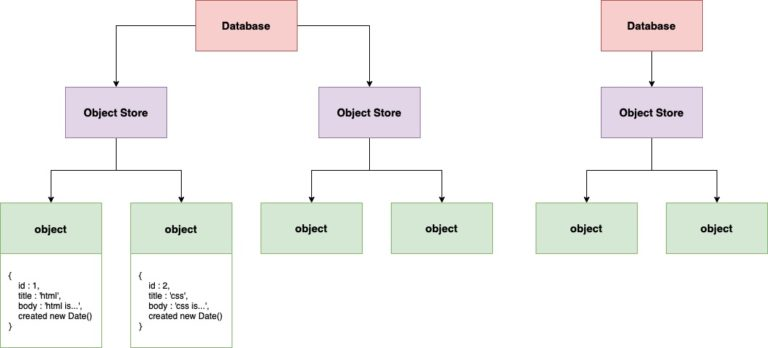
Database
- Version과 N개의
Object Store를 가진다. - 브라우저는 여러
Database를 가질 수 있다. indexedDB.open(db_name, version)으로 열수 있다.
Object Store
- 데이터를 담는 공간이다.
- N개의 레코드(Key-Value) 를 가질 수 있다.
- Value의 형태는 다른 Value들과 일치하지 않아도 된다.
- 레코드는 Key에 따라 오름차순으로 정렬된다.
- Object Store 이름은 고유 해야한다.
IDBRequest.createObjectStore(store_name, \{keyPath: 'id'\})로 만들 수 있다.- Object store 에 key path 를 설정하면, in-line keys (내부 key) 를 사용하며, 그 외에는 out-of-line keys (외부 key) 를 사용한다.
IndexedDB API
Transaction
- IndexedDB API 작업은 transaction contect 내에서 발생한다.
- transaction contect 내에서 작업이 실패하면, 해당 작업 상태는 적용되지 않고, 이전 상태로 돌아간다.
- 만약 transaction 외부에서 IndexedDB API 를 호출하면, 에러가 발행한다.
- IDBRequest.transaction 로 만들수 있다.
- transaction 은 readwrite, readonly, versionchange 상태를 가질 수 있다.
Cursor
- Cursor 는 Object Store 내의 레코드를 순회할 수 있는 방법이다.
IDBObjectStore.openCursor()에 key, keyRange를 넣어 호출하고,IDBCursorWithValue.continue()로 다음 레코드로 이동할 수 있다.
Index
- Object Store 에서 특정 필드를 인덱싱하여 검색을 빠르게 할 수 있다.
IDBObjectStore.createIndex(index_name, keyPath)로 만들 수 있다.Object Store에 Index와 관련된 레코드가 업데이트 되면, Index도 업데이트 된다.
예제
DB 생성
indexedDB.open으로 DB를 생성할 수 있으며, 비동기로 처리되어 success 시의 이벤트를 처리할 수 있다.\
const request = window.indexedDB.open('myDB', 1);

request.onerror = (event) => {
  console.log('DB Error', event);
};

request.onupgradeneeded = (event) => {
  const db = event.target.result;
  const objectStore = db.createObjectStore('myObjectStore', { keyPath: 'id' });
  objectStore.createIndex('name', 'name', { unique: false });
};

request.onsuccess = (event) => {
  const db = event.target.result;
  console.log('DB Opened', db);
};- onupgradeneeded
- Name 또는 Version과 일치하는 데이터베이스가 없는 경우 호출되며 데이터베이스를 생성한다.
- onsuccess
- Name과 Version 모두 일치하는 데이터베이스가 있는 경우 호출된다.
- error
- Name이 일치하지만 존재하는 DB의 Version 보다 낮은 Version을 호출하면 error가 발생한다.
Object Store 생성
버전이 변경되었을 때 실행되는 upgradeneeded 이벤트와 함께 스토어를 생성하며, 식별자(key-path)를 지정한다.
이 때 버전을 기준으로 스토어를 추가해주거나 삭제하는 것도 가능하다.
request.onupgradeneeded = (event) => {
  const db = event.target.result;
  const objectStore = db.createObjectStore('myObjectStore', { keyPath: 'id' });

  if (event.oldVersion < 2) {
    db.createObjectStore('myObjectStore2', { keyPath: 'id' });
  }
};
데이터 추가하기
IDBObjectStore.add 메서드를 사용하여 데이터를 추가할 수 있다.
<button
  onClick={() => {
    const request = db
      .transaction(['myObjectStore'], 'readwrite')
      .objectStore('myObjectStore')
      .add({ id: 1, name: 'John', age: 30 });

    request.onsuccess = (event) => {
      console.log('Data added', event);
    };
  }}
/>
데이터 조회하기
IDBObjectStore.get 메서드를 사용하여 데이터를 조회할 수 있다.
<button
  onClick={() => {
    const request = db.transaction(['myObjectStore'], 'readonly').objectStore('myObjectStore').get(1);

    request.onsuccess = (event) => {
      console.log('Data fetched', event.target.result);
    };
  }}
/>
결과값
| # | 키(키 경로: id) | 값 |
|---|---|---|
| 1 | 1 | { id: 1, name: 'John', age: 30 } |
데이터 수정하기
IDBObjectStore.put 메서드를 사용하여 데이터를 수정할 수 있다.
<button
  onClick={() => {
    const request = db
      .transaction(['myObjectStore'], 'readwrite')
      .objectStore('myObjectStore')
      .put({ id: 1, name: 'John', age: 31 });

    request.onsuccess = (event) => {
      console.log('Data updated', event);
    };
  }}
/>
결과값
| # | 키(키 경로: id) | 값 |
|---|---|---|
| 1 | 1 | { id: 1, name: 'John', age: 31 } |
데이터 삭제하기
IDBObjectStore.delete 메서드를 사용하여 데이터를 삭제할 수 있다.
<button
  onClick={() => {
    const request = db.transaction(['myObjectStore'], 'readwrite').objectStore('myObjectStore').delete(1);

    request.onsuccess = (event) => {
      console.log('Data deleted', event);
    };
  }}
/>
결과값
| # | 키(키 경로: id) | 값 |
|---|
데이터 조회하기 (Cursor)
IDBObjectStore.openCursor 메서드를 사용하여 데이터를 조회할 수 있다.
<button
  onClick={() => {
    const request = db.transaction(['myObjectStore'], 'readonly').objectStore('myObjectStore').openCursor();

    request.onsuccess = (event) => {
      const cursor = event.target.result;
      if (cursor) {
        console.log('Data fetched', cursor.value);
        cursor.continue();
      }
    };
  }}
/>
실제 사용 예시
- 직접
indexedDB를 다루기보다는 라이브러리를 통해 컨트롤 한다.- Dexie.js 라이브러리를 사용하면
indexedDB를 쉽고 간편하게 다룰 수 있다.
- Dexie.js 라이브러리를 사용하면
- Slack (Web)
- redux persist를 위한 공간으로 사용한다.
- 채널 리스트, 읽음 여부 등의 정보를 저장하는 것 같다.
- Youtube
- permission이나 idtoken, guide section에 rendering할 데이터들 등을 저장하는 것 같다.
결론
indexedDB는 대용량 데이터를 저장하고 관리할 수 있는 브라우저 내부 데이터베이스이다.localStorage,sessionStorage와 달리 비동기적으로 작동하며, 트랜잭션을 사용하여 데이터를 저장하고 관리할 수 있다.indexedDB를 직접 다루기보다는 라이브러리를 사용하여 컨트롤하는 것이 좋다.- 적재적소에 사용하면 좋을 것 같다.
Ref.